CLI Agents + Obsidian:
A Practical Guide
How to turn a terminal AI agent and a folder of markdown files into an autonomous personal operating system. No frameworks, no SaaS — just a CLI, a schema, and plain text.
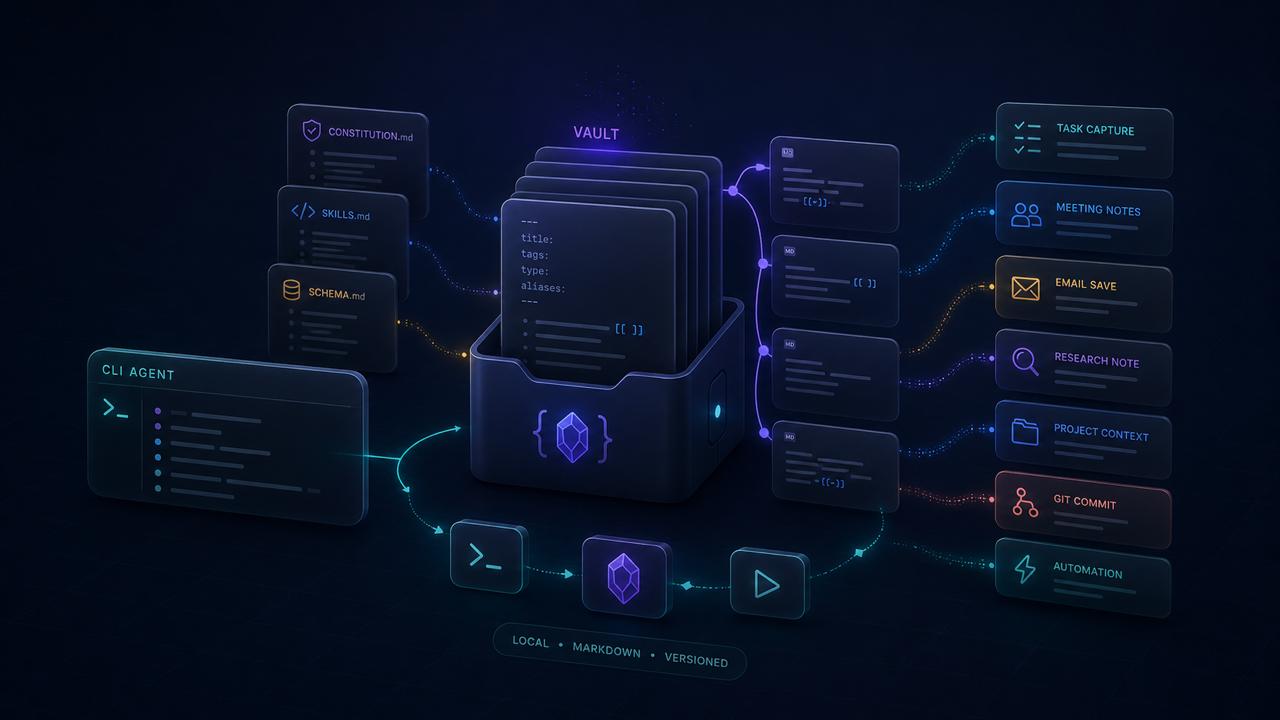
1The idea
Most people use AI through a chat window. You type a question, get an answer, copy-paste it somewhere. That works, but it’s a fraction of what’s possible.
CLI agents are different. They run in your terminal, have access to your filesystem, and can read and write files autonomously. Give them a well-structured knowledge base — like an Obsidian vault — and they become something closer to a personal operating system than a chatbot.
Here’s the core loop:
The agent knows your contacts, projects, tasks, and writing style. It drafts emails in your voice, logs meetings, creates tasks from conversations, and commits results to git. All from the terminal.
2The tools
Three CLI agents exist today that can work with local files. Each has different strengths:
| Tool | Strengths | Best for |
|---|---|---|
| Claude Code | Strongest reasoning, custom skills system (CLAUDE.md), tool use, MCP server support, subagent spawning | Complex multi-step workflows, writing, vault management |
| Gemini CLI | 1M token context window, fast, Google ecosystem integration, GEMINI.md instructions | Large file analysis, long conversations, research |
| Codex | OpenAI models, sandboxed execution, AGENTS.md instructions | Code generation, refactoring, testing |
These tools can share the same instruction files and vault. I use Claude Code as my primary agent and Gemini CLI for tasks that benefit from a huge context window. The vault is the shared brain — the agent is just the interface.
Installation
npm install -g @anthropic-ai/claude-code
cd ~/my-vault
claudenpm install -g @anthropic-ai/gemini-cli
cd ~/my-vault && gemininpm install -g @openai/codex
cd ~/my-vault && codexWhen you launch from your vault directory, the agent automatically picks up your instruction files. That’s where the magic starts.
3Obsidian as your database
Obsidian is a markdown editor, but if you structure your vault with a consistent schema, it becomes a queryable knowledge base. No API, no database server — just folders and frontmatter.
Why markdown?
- Agents can read and write it natively — no SDK, no API calls
- Git-trackable — every change has a commit history
- Human-readable — you can always open it in any text editor
- Frontmatter = structured data — YAML metadata makes notes queryable
- WikiLinks = relations —
[[john-doe]]is a foreign key
A minimal schema
The power comes from consistency. Define note types, give each a frontmatter template, and stick to it. Here’s a minimal example:
# Folder structure
vault/
  notes/          # timestamped notes (flat)
  entities/       # people, companies
  projects/       # active projects
Each note has typed frontmatter:
---
type: entity
category: person
slug: john-doe
title: "John Doe"
company: "Acme Corp"
role: "Engineering Lead"
email: "john@acme.com"
phone: "+31 6 12345678"
contact_frequency: 30  # days
last_contact: 2026-02-15
---

# John Doe

Engineering Lead at Acme Corp. Met at ReactConf 2025.

## Notes

- Interested in Rust migration
- Prefers async communication---
type: interaction
category: call
slug: 20260310-0900-call-john
entity: [john-doe]
area: work
project: api-redesign
---
# Call with John
Discussed the API migration timeline.
Agreed to start Phase 2 next sprint.The agent can now find all interactions with John, check when you last spoke, see which project it relates to, and update the contact tracking — all by reading markdown files.
My vault has 12,000+ notes across 11 note types. The agent navigates it in seconds using glob patterns and grep. No database needed.
4Teaching the agent your world
Every CLI agent supports a project-level instruction file that it reads on startup:
| Agent | File | Loaded when |
|---|---|---|
| Claude Code | CLAUDE.md |
Auto-loaded from working directory + parents |
| Gemini CLI | GEMINI.md |
Auto-loaded from working directory |
| Codex | AGENTS.md |
Auto-loaded from working directory |
This file is your agent’s constitution. It defines:
- Vault structure — where things live, naming conventions
- Schema rules — what types exist, required fields, valid categories
- Behavioral rules — language, formatting, link conventions
- Common mistakes — explicit “don’t do this” examples
# Vault Instructions

## Structure
- `notes/` → timestamped notes (YYYYMMDD-HHmm-slug.md)
- `entities/` → people, companies (slug.md)
- `projects/` → active projects

## Rules
- WikiLinks only: [[slug]], never markdown links
- Entity field always as array: entity: [john-doe]
- Frontmatter timestamp format: YYYYMMDD-HHmm
- Language: English
- Commit after completing tasks

## Note Types
- entity (person, company)
- interaction (call, meeting, email, chat)
- task (screen, people, money, hands)
- project (personal, client)
- reference (bookmark, article, book)

## Don't
- Never create subfolders in notes/
- Never put type in filename (it's in frontmatter)
- Never use placeholder WikiLinks
The more precise your instructions, the fewer mistakes the agent makes. This investment compounds across every conversation.
Don’t dump your entire schema into CLAUDE.md. Keep the main file concise and reference separate docs: @docs/schema.md for the full data model. Claude Code follows @-references automatically.
5Agent skills
Skills are reusable instruction sets that the agent loads on demand. Think of them as specialized modes — each one teaches the agent a specific workflow.
Claude Code supports custom slash commands. You place a SKILL.md file in .claude/skills/your-skill/, and it becomes available as /your-skill in the conversation.
# Save Email Skill

Save incoming emails from Apple Mail to the vault.

## Steps
1. Fetch the selected email via AppleScript
2. Find or create the sender entity
3. Create an interaction note (type: interaction, category: mail)
4. Update entity last_contact
5. Link to project if applicable
6. Commit with conventional commit message

## Template
(frontmatter template here...)

## Rules
- Direction: received (inbox) or sent (sent items)
- Always include mail_link for deep linking back to Mail.app
- Entity matching: fuzzy match on email address
Now typing /save-email triggers this entire workflow. The agent reads the skill, follows the steps, and handles the full pipeline autonomously.
Skill examples from daily use
| Skill | What it does |
|---|---|
/save-email |
Fetches inbox, saves emails as vault interaction notes, updates contacts |
/meeting |
Pre-meeting: gathers entity context, recent interactions, open tasks. Post-meeting: creates notes with follow-ups |
/focus |
Morning planning: calendar + overdue tasks + priorities for the day |
/research |
Multi-source web research with comparison tables, saves to vault |
/ledger |
Scans conversation for actionable items, creates task notes in vault |
/next |
Picks the highest-priority task and implements it |
The pipeline becomes: have a conversation → /ledger captures tasks → /next executes them. The vault is always the source of truth.
6Real workflows
Morning routine
$ claude
> /focus

# Agent reads:
# - Today's calendar (via AppleScript)
# - Overdue tasks from vault
# - Contacts due for follow-up
# - Active project statuses
#
# Outputs a prioritized daily plan
Processing email
> /save-email

# Agent fetches inbox via AppleScript, shows each email:
# "From: John Doe - API timeline update"
#
# → Matches sender to [[john-doe]] entity
# → Creates interaction note with mail_link
# → Updates last_contact on entity
# → Asks: "Create follow-up task?" → creates linked task
# → Commits everything, moves to next email
After a meeting
> I just had a call with Sarah about the Q2 roadmap.
> She wants to prioritize mobile. Budget approved for contractor.
> Follow up next week with timeline.

# → Interaction note linked to [[sarah-chen]] + [[q2-roadmap]]
# → Task: "Send Q2 timeline to Sarah" (due: next week)
# → Entity last_contact updated, everything committed
Research with vault storage
> /research best standing desks under 800 EUR

# → Web search across multiple sources
# → Comparison table with specs and prices
# → Reference note saved to vault, committed7Getting started
You don’t need thousands of notes. Here’s a minimal setup:
Step 1: Structure your vault
mkdir -p vault/{notes,entities,projects}
cd vault
git init
Step 2: Create your instruction file
# Create CLAUDE.md (or GEMINI.md, AGENTS.md)
# Start simple. Add rules as you discover what the agent gets wrong.
Start with:
- Folder structure and naming conventions
- 2–3 note types with frontmatter templates
- Basic rules (link format, language, commit style)
Step 3: Create a few seed notes
Add a few entities (people you work with), a project, and a couple of interaction notes. The agent needs examples to learn patterns.
Step 4: Start using it
cd vault
claude  # or gemini, codex

> Create a task to review the API docs by Friday

# The agent reads your CLAUDE.md, understands the schema,
# and creates a properly formatted task note.
Step 5: Iterate
When the agent makes a mistake, add a rule. When you repeat a workflow, extract it into a skill. The system gets smarter through use.
After a few weeks, the agent knows your contacts, understands your projects, follows your conventions, and can autonomously handle workflows that used to take 15 minutes of manual work. The investment in schema and instructions pays back every single day.
Where to go from here
- Claude Code docs — Skills, hooks, MCP servers, subagents
- Obsidian — Dataview plugin for querying frontmatter, Templater for note creation
- MCP servers — Connect your agent to external tools (GitHub, Slack, calendars, databases)
- Git hooks — Auto-validate vault schema on commit
The vault is the platform. The AI agent is just the most powerful interface to it. Your data stays in plain text, version-controlled, and yours forever.